


NOVA Community
3.93.00 Reviews
App Specs
- Version
- 1.2.3
- Updated On
- License
- Free
- Downloads
- 10,000+
- Developer
- ENSAPIA Corporation
- Categories
- Social
- Platform
- Android
Screenshots
 Analysis by AppCompare
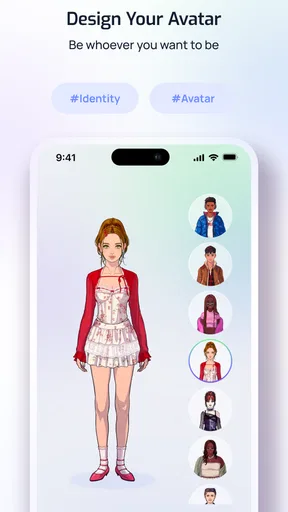
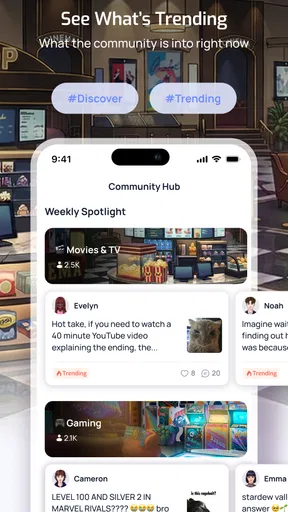
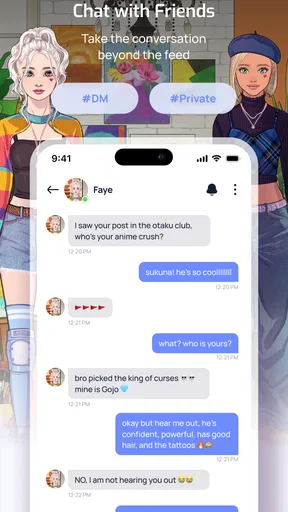
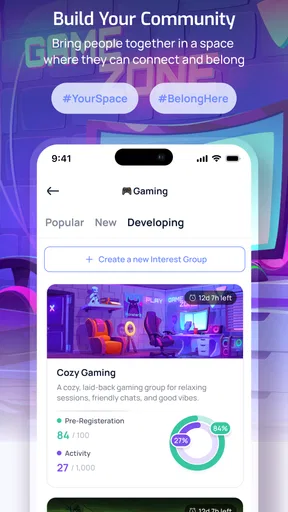
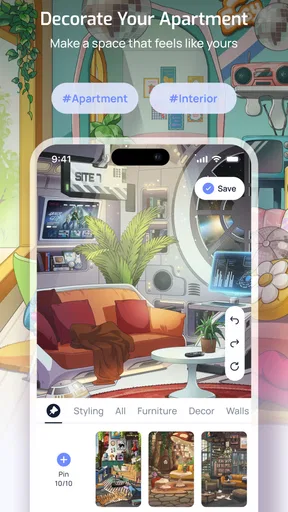
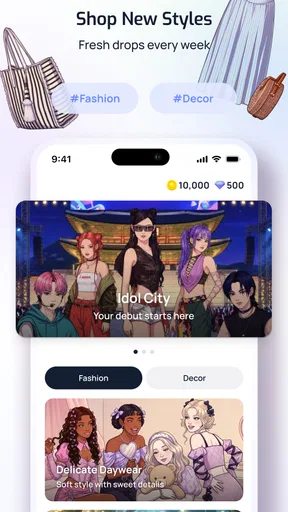
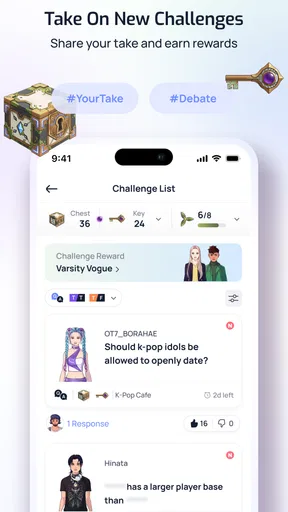
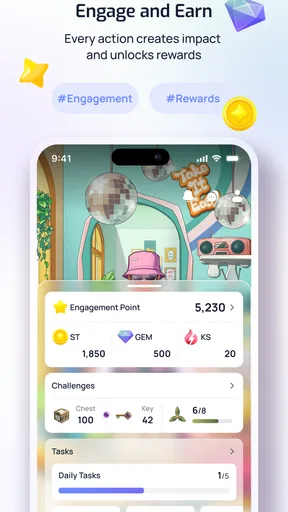
NOVA Community is a social app built around the idea of bringing people together through voices and avatars. I found that positioning more interesting than a standard discussion feed because it suggests a space where identity and conversation matter as much as written posts. The app is developed by ENSAPIA Corporation, and its current presentation places it in the social category rather than treating it as a messaging tool, a game, or a conventional creator platform.
My first impression is that this is an app for people who enjoy discovering communities and expressing themselves in a more personal way than a text-only profile allows. The combination of voice and avatar gives it a distinct direction, but it also means the experience will depend heavily on whether enough of the right people are there. A social network can have an appealing concept and still feel quiet if your friends or preferred communities have not joined.
The app is free to install, which makes trying it relatively easy. It is marked for Teen users, so it is aimed at a broader audience than an adults-only social service, while still requiring the kind of judgment that applies to any platform involving public interaction. I would approach it as a place to explore carefully rather than immediately sharing personal details or treating every new contact as trustworthy.
How the current version feels in everyday use
The current version is 1.2.3, and that detail matters because NOVA Community still feels like a product whose direction is taking shape. I would not judge it only by the promise of its concept. The more useful question is whether its voice-and-avatar approach gives me a reason to return after the first session.
For a casual user, the most natural starting point is to create an identity that feels comfortable without revealing too much. An avatar can act as a useful boundary: I can participate socially while keeping my real-world image separate from the account. Voice adds another layer of presence, but it also changes the level of exposure. Speaking can feel warmer and faster than typing, yet it requires more confidence and a quieter environment.
That makes the app especially suitable for people who find ordinary comment feeds tiring. If I want to meet others around shared interests, hear personality in conversation, and use a visual identity that is not simply a photograph, this format has a clear appeal. It may also suit users who enjoy experimenting with how they present themselves online instead of maintaining the same profile everywhere.
A realistic everyday use case would be checking the app during a short break, browsing a community, and joining a conversation without committing to a long private chat. Later, I might return to follow a discussion or speak with the same group. That lightweight pattern is where the concept could work best: the app becomes a social room I can visit when I have time, rather than another service demanding constant attention.
Worth Reading Before You Choose

Flipboard Shows What News Apps Must Do Beyond the Feed

Switching to Android Auto Means Rethinking Your Driving Routine

Google Calendar Makes a Crowded Week Easier to Manage

Ludo King Makes the Most of the Minutes Between Plans

Baby Panda World Brings Quick Play to Modern Phones, but Its Game Library Feels Busy

ESPN’s Live Game View Makes Following Close Games Easier
There is also a practical trade-off. Voice is more expressive than text, but it is less convenient in public places, at work, or late at night. Text-based communities remain better when I need searchable information, quiet participation, or a record I can revisit. NOVA Community is more compelling when the human presence of a conversation matters more than permanent, carefully edited posts.
Who will get the most from the format
I think the strongest audience is made up of socially curious users who like meeting people through shared spaces rather than sending isolated friend requests. It may also appeal to people who are comfortable with avatars and want a profile that communicates personality without relying on a real photograph.
It is less convincing for someone seeking a polished professional network, a private family messenger, or a highly organized knowledge base. Those needs are normally better served by platforms built around direct contacts, workplace identity, or searchable written content. The app’s value is social atmosphere, not formal productivity.
Users who dislike voice interaction should think carefully before installing it. Even if an avatar makes participation feel less exposed, speaking still requires a level of comfort that text does not. Someone who mainly wants to read quietly may find a conventional community forum more efficient.
Parents and younger users should also treat the Teen content rating as a starting point for sensible supervision, not as a guarantee that every interaction will be suitable for every person. The social nature of the app means personal boundaries matter. I would recommend using a distinct username, avoiding unnecessary personal information, and taking time to understand how conversations work before becoming active.
What the current release tells me about its direction
The move to version 1.2.3 suggests an app that has already progressed beyond an initial launch build, but I would separate that confirmed version number from assumptions about what may come next. A version label alone does not prove that every rough edge has been solved, nor does it promise a particular roadmap. It simply gives users a clear snapshot of the build they are evaluating now.
That distinction is important with a community product. The experience can change quickly as people join, leave, form groups, and establish their own habits. A feature that feels underused today might become much more useful once a relevant community grows around it. Conversely, a promising social concept can lose momentum if conversations do not stay active.
At the moment, I would describe the app as an early-stage social environment with a recognizable identity rather than a fully mature replacement for every network on my phone. Its appeal comes from the combination of voices and avatars, while its biggest test is whether that combination creates sustained interaction instead of a brief novelty.
The developer, ENSAPIA Corporation, has room to make the product easier to understand through future refinement. New users need to know what kind of participation is expected, how they can move from browsing to joining in, and how the app differs from a normal feed or chat service. Clear onboarding would be especially valuable here because the concept spans several familiar categories without fitting neatly into only one of them.
How the release affects people already using it
For existing users, the current build is best approached as a checkpoint rather than a complete reset of expectations. If I already enjoy the app’s social style, the main benefit is having a stable version to continue exploring while the community develops. I would pay attention to which spaces remain active, which conversations attract thoughtful participation, and whether returning users can easily find people they already enjoyed meeting.
The most important improvement for an established user is not necessarily a flashy addition. It is continuity. A social app becomes more useful when I can recognize familiar voices, maintain a consistent avatar identity, and return to conversations without feeling lost. Any change that improves that sense of continuity would have a larger practical effect than a cosmetic adjustment that looks impressive for one session.
There is a useful workflow for current users who want to get more from the app without spending all day inside it. I would choose a small number of communities or conversation themes, check them at set times, and avoid treating every notification as urgent. Voice-based social spaces can encourage longer sessions because conversation feels immediate. Setting a personal stopping point helps keep the app enjoyable rather than turning it into background noise.
I would also keep expectations realistic about audience size. The app has passed ten thousand installs, which indicates that it has reached an initial group of users, but that is not the same as having a large, active network in every interest area. The average rating is 3.7, based on 21 ratings, so the public response looks mixed rather than universally enthusiastic. I see that as a reason to test the specific communities I care about instead of assuming the overall score predicts my exact experience.
That modest scale can be an advantage for some people. Smaller communities may feel less overwhelming and make it easier to recognize regular participants. The downside is that a niche interest may have limited activity, and a user in a different time zone may find conversations intermittent. In a large mainstream network, I can usually locate an active discussion immediately; here, patience and targeted exploration may matter more.
The practical limits I would consider first
The clearest limitation is the tension between a fresh social format and the habits people already have elsewhere. Most users already maintain accounts on services with established contacts, familiar feeds, and years of accumulated content. NOVA Community has to offer more than another place to scroll. Its voice-and-avatar identity is a meaningful distinction, but it may not be enough for someone who only wants fast updates from existing friends.
Voice can also create friction that written posts avoid. Background noise, privacy, accent anxiety, and the need to respond in real time can all affect participation. A person may enjoy listening but hesitate to speak, which means the app needs to make passive discovery feel worthwhile too. If the experience assumes that everyone wants to talk immediately, quieter users may feel excluded.
Avatars bring their own trade-off. They can make self-expression playful and reduce pressure around appearance, but they can also make it harder to judge who is behind an account. I would be careful about confusing a friendly avatar or pleasant voice with genuine trust. The format can encourage openness, so boundaries should remain stronger than the atmosphere might suggest.
The free price lowers the barrier to entry, but in-app purchases range from $1.99 to $49.99 per item. I would check the purchase flow carefully before spending money and decide what, if anything, would genuinely improve my use of the app. A social platform should not make me feel that participation requires optional spending. For younger users, purchase controls are particularly important.
The app supports devices running Android 8.0 or later, which covers a broad range of phones but still excludes older hardware. On a compatible device, I would make sure the operating system is current enough for reliable social use and keep an eye on battery or data habits during voice-heavy sessions. Voice interaction can be more demanding than reading a static feed, especially when used for long periods.
Another limitation is the small amount of public feedback available so far: there are two written reviews alongside the ratings. That does not tell me whether the app is good or bad, but it does mean a prospective user should rely on a short personal trial rather than expecting a deep consensus from other users. I would install it, explore the communities that matter to me, and decide based on actual activity and comfort.
How it compares with familiar social alternatives
Compared with a standard social network, NOVA Community appears more focused on presence and identity than on a broad stream of polished updates. A conventional network is usually better for keeping up with real-life contacts, sharing links, and scanning a large amount of information quickly. This app makes more sense when I want social interaction to feel like entering a shared space.
Compared with a messaging app, it is less naturally suited to private, dependable communication with people I already know. Messaging tools win when I need a direct reply, a family group, or a conversation that stays within a trusted circle. NOVA Community is more exploratory, which can be exciting but also requires more care around who I engage with.
Compared with discussion forums, the voice-and-avatar approach may feel more immediate and personal. Forums are stronger for detailed written answers, long-term reference, and asynchronous participation. If I am researching a technical problem or want to return to a precise explanation later, text remains the better tool. If I want to sense personality and spontaneity, the newer format has an advantage.
Compared with live-streaming platforms, the app seems better framed around community participation than simply watching a prominent creator. That could make interactions feel more balanced, although it also means the experience depends on finding a group that fits. I would choose it over a broadcast-first service when I want to participate rather than remain an audience member.
What I would watch as the product evolves
The next meaningful signs of progress should be visible in everyday usability, not just in version numbers. I would watch for clearer ways to discover relevant communities, return to familiar conversations, and manage the difference between listening, speaking, and simply browsing. Those details determine whether the app becomes a habit or remains an occasional experiment.
I would also watch how the community culture develops. A voice-centered service needs respectful participation, useful reporting and blocking choices, and a clear sense of what happens when conversations become uncomfortable. I am not treating any future improvement as guaranteed, but these are the areas that would most affect my willingness to spend time there.
Another important signal will be whether the app can balance expressive avatars with authentic interaction. If avatars become a genuine creative tool, they can help the service stand apart. If they are only decoration around ordinary social behavior, the distinction may feel shallow. The strongest evolution would connect the visual identity and voice experience so that each supports the other.
For current and future users, I suggest testing the app with a specific purpose rather than installing it out of vague curiosity. Pick one interest, spend enough time to see whether conversations are active, and notice whether you feel comfortable participating without oversharing. This approach reveals much more than judging the opening screen or the concept alone.
My final view is cautiously positive. The app has a clear personality, a free entry point, and an appealing alternative to text-only social feeds. I like the possibility of using an avatar to shape my online identity while connecting through voice, especially in smaller communities where conversation can feel more direct. At the same time, I would not recommend it as a universal replacement for messaging apps, established networks, or forums.
My recommendation is to try it if you want a social experience built around voices and avatars, but keep your expectations tied to the communities you actually find. It is a good fit for curious users who enjoy discovering people and participating informally. I would skip it if I mainly need private communication, searchable information, professional networking, or a consistently busy feed. With its current version and still-developing audience, NOVA Community is most promising as a focused experiment in social presence—not as an all-purpose app for every kind of connection.
ENSAPIA Corporation has created a concept that is easy to understand once experienced, but its long-term success will depend on turning that concept into a reliable daily reason to return. If future development strengthens discovery, continuity, comfort, and community quality, the app could become more distinctive over time. For now, I see it as worth exploring selectively, especially for users who feel that ordinary social feeds have become too impersonal.
Pros
- Connects fans through shared interests and discussions.
- Makes it easy to discover communities and new conversations.
- Supports direct interaction with other members.
- Useful for exchanging tips
- opinions
- and recommendations.
- Community feedback can help users find relevant content quickly.
Cons
- Some communities may have limited activity or slow responses.
- Content quality can vary depending on community moderators.
- Public discussions may expose more of your profile information.
- Notifications can become distracting in busy communities.
- Finding reliable information may require checking multiple posts.
FAQs for NOVA Community
What is NOVA Community, and what can users do with the app?
NOVA Community is a social platform designed to help people connect, communicate, and participate in shared communities from a mobile device. Depending on the available features, users may be able to create a profile, join groups, publish posts, exchange messages, comment on content, and follow community updates. It is best suited to users who want a dedicated space for discussions and interaction rather than a traditional one-to-one messaging app.
Is NOVA Community free to download and use?
NOVA Community can generally be downloaded without an upfront charge, but the exact cost structure may depend on the version available for Android or iOS. Some features could require registration, subscriptions, donations, or optional in-app purchases. Before creating an account or sharing payment information, check the app-store listing and the developer’s terms carefully so you understand which functions are free and whether any recurring charges apply.
Do I need to create an account to use NOVA Community?
Most community-based applications require users to register before they can participate fully, and NOVA Community may follow the same approach. An account can be necessary for posting, commenting, joining discussions, or receiving notifications. Registration may request details such as an email address, username, or profile information. Review the sign-up screen and privacy policy before submitting personal data, especially if you prefer to keep your online identity limited.
Is NOVA Community safe for sharing personal information and communicating with others?
As with any social or community app, users should be careful about the information they publish and the people they interact with. Avoid sharing passwords, financial details, precise location information, or private documents in posts and messages. Check whether NOVA Community provides blocking, reporting, moderation, and privacy controls, and use them whenever necessary. Also review the permissions requested by the app and disable any access that does not seem essential.
What devices and permissions are required to use NOVA Community?
NOVA Community is intended for mobile use, but compatibility can vary according to the operating system version, device model, and app release. Before downloading, confirm the current Android or iOS requirements in the official store. The app may request permissions for notifications, camera, photos, microphone, contacts, or storage if those functions are supported. Grant only the permissions you are comfortable with, since some features may work without every permission enabled.


